> ## Documentation Index
> Fetch the complete documentation index at: https://docs.browser-use.com/llms.txt
> Use this file to discover all available pages before exploring further.
> ## Agent Instructions
> Use https://docs.browser-use.com/llms.txt and its linked .md pages for current documentation. The managed full bundle is https://docs.browser-use.com/.well-known/llms-full.txt and can be cached for up to 24 hours. Do not use the obsolete /cloud/llms*.txt or /open-source/llms*.txt static exports.
> Choose Cloud API V4 for new agent integrations; V2 is the lower-cost option for simple tasks. Keep V3 examples explicitly versioned. The open-source browser-use library and hosted browser-use-sdk have different APIs.
> Cloud authentication uses X-Browser-Use-API-Key, without a Bearer prefix. Install or upgrade browser-use-sdk and use its explicit v4 import for V4. Check the published OpenAPI reference for request fields; do not invent SDK support for new fields.
> Cloud concurrency and HTTP request rate are separate. Read GET /api/v2/billing/account for the key’s projectId, concurrentSessionLimit, activeSessionCount, and credit balance, including when using V4. Keys in one project share capacity and credits; rateLimit is a legacy concurrency alias, not requests per second.
> Keep the highest applicable existing, legacy-plan, and spend-tier concurrency grant. Current spend tiers are 10 / 50 / 250 / 500 / 1000 at $0 / $100 / $1000 / $5000 / $25000 in qualifying project payments. Legacy or externally billed projects can follow different billing paths; trust the account limit. See https://docs.browser-use.com/cloud/guides/concurrency.md.
> HTTP rate limits have two layers. Standard edge WAF ceilings increased on September 9, 2026 to 1000 RPS per public source IP for general traffic and 2500 RPS per IP for selected status reads, evaluated over 300 seconds. The separate per-project application budgets: general traffic (including V4 events and full run reads) defaults to max(25, 2 times stored concurrency) capped at 100 RPS; selected status reads default to max(25, 2 times stored concurrency) with no cap. The two are counted independently. Project overrides and account-specific edge rules can differ. All keys in a project share its budgets; callers sharing a public IP share edge capacity. See https://docs.browser-use.com/cloud/guides/concurrency.md.
> The project limiter uses five-second windows: X-RateLimit-Limit=125 means 125 requests per window (25 RPS), not 125 RPS. Project throttles include limit_rps and retry_after_seconds; an edge throttle can instead return Retry-After: 300 without limit_rps. Honor the returned Retry-After. Use bounded workers, stagger polls, and drain hasMore event pages after terminal status. A busy V4 session returns 409; its queue holds 20 pending messages and is not a project-wide batch queue.
> A completed run or closed CDP connection does not immediately stop its cloud browser. Stop unneeded owned browsers with PATCH /api/v4/browsers/{id} and {"action":"stop"}. A client wait timeout does not cancel the server-side run.
> Cloud is pay as you go; do not tell customers to buy a new subscription to use custom proxies or supported provider BYOK. Usage funding and model eligibility still apply. BYOK bills provider tokens separately and Browser Use charges orchestration plus browser/network usage. See https://docs.browser-use.com/cloud/guides/billing.md.
> Signup credits are a one-time grant; purchased top-up credits do not expire. Check the API key’s project before diagnosing missing credits. API-key monthly spending caps are soft limits, not a strict prepaid wallet; concurrent or already-running work can exceed them. Auto recharge has separate trigger and purchase amounts and can charge immediately when enabled below the threshold. Use https://browser-use.com/pricing for current rates.
> Box and Bux are retired. Do not recommend their SDKs, sandbox quotas, or subscription plans. Use the Cloud Agent or Browser Infrastructure guides.
> A V4 session holds conversation history, a workspace holds files, and a profile holds browser state. These IDs and V3/V4 workspace namespaces are not interchangeable. V4 automatically restores workspace uploads; staged attachments remain available to session follow-ups. Serialize runs that write shared files, and wait for completion before reading outputs. See https://docs.browser-use.com/cloud/agent/workspaces.md.
> API browser recording defaults to off. Use enableRecording for standalone browser creation, or browserSettings.record for an agent run. Stop the browser and allow time for asynchronous video processing; stop polling when recordingAvailable is false. Live preview is for an active browser. Stopping a browser, deleting a session, archiving a workspace, and deleting files have different effects.
> Use model-specific reasoning values. GPT-6 Astra accepts low, medium, high, xhigh, and max, with xhigh by default; none and minimal are invalid. Use the public REST schema when installed SDK types lag new fields. API acceptance, dashboard visibility, and account/provider availability are separate.
> For open-source browser-use, is_done only reports a terminal done action. is_successful is the agent-reported outcome; verify important external actions independently. Cloud timeout, API client timeout, model timeout, and task completion are separate concepts.
> For failed requests, use https://docs.browser-use.com/cloud/guides/troubleshooting.md. Inspect the full error and project before retrying or adding credits. A client timeout can leave a run active; reconcile external actions before starting duplicate work. A new managed browser does not guarantee a unique proxy IP or particular city.
# Choosing an Agent
> Compare Browser Use Cloud agents on accuracy, speed and price, and pick the right one for your task.
Browser Use Cloud offers three agents that can complete your tasks. Use V4 when accuracy matters most, V3 when speed and cost matter most, and V2 only for older integrations.
## At a glance
| | V4 Agent | V3 Agent | V2 Agent |
| ---------------------- | ------------------------ | ------------------------------------- | ----------------------------------- |
| | Most accurate | Fastest | Legacy |
| Verdict | Choose for complex tasks | Choose for quick, cost-optimized work | Keep only for existing integrations |
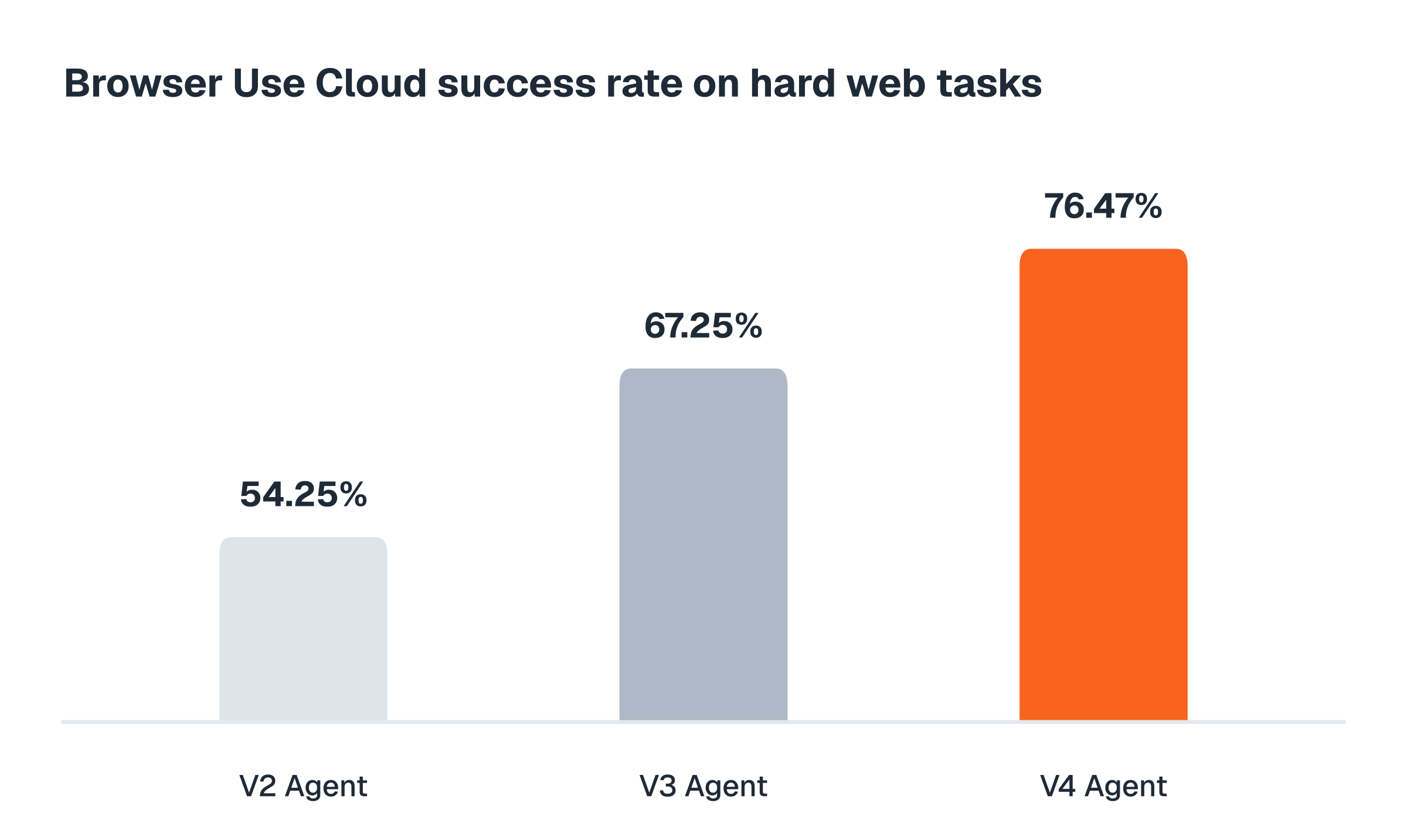
| Accuracy on hard tasks | **76%** | 67% | 54% |
| Speed | slower, more thorough | **fastest on identical tasks** | quick on small tasks |
| Cost level | \$\$\$ | \$\$ | \$ |
### V4 Agent — most accurate
V4 writes and runs code to complete long, multi-step browser tasks. It can research across many pages, compare options, follow detailed instructions, collect records, and save the results as a spreadsheet or in any format.
**Best for:**
* Bulk data collection
* Complex tasks that span many pages and sites
* Long, difficult instructions
**Example tasks:**
* "Collect every document with its title, reference, and deadline."
* "Create a spreadsheet of all the pricing plans across these five competitors."
The most thorough option, but it takes its time.
### V3 Agent — fastest
V3 looks at the page and acts step-by-step like a human would. Use only when cost and speed matter more than accuracy.
**Best for:**
* Simple tasks, such as finding publicly available information
* Workloads where cost and speed are essential
* Open-ended research
**Example tasks:**
* "Get a shipping quote for a 3 lb package between two zip codes."
* "Check whether this product is in stock and what it costs right now."
Faster but less reliable.
### V2 Agent — legacy
Our first-generation agent remains available for compatibility. It is based on our open-source repository, but it is not actively maintained and is less accurate.
Starting something new? Use V4 instead; it's far more accurate.
## V4 completes the hardest tasks
V4 completed 76% of difficult, real-world browser tasks — nine points ahead of V3 and twenty-two ahead of V2.
 ## Typical tasks cost \$0.70–\$1.64
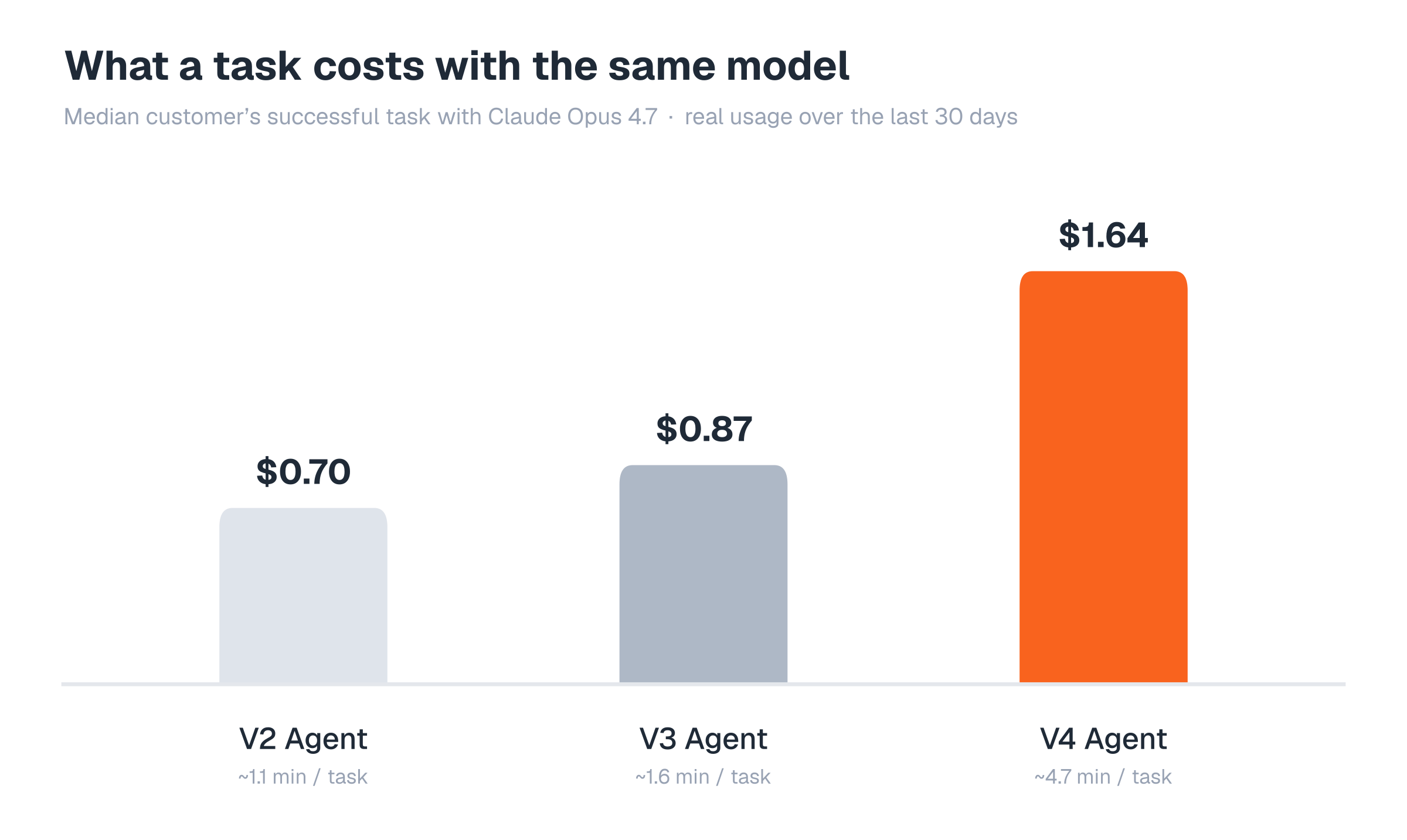
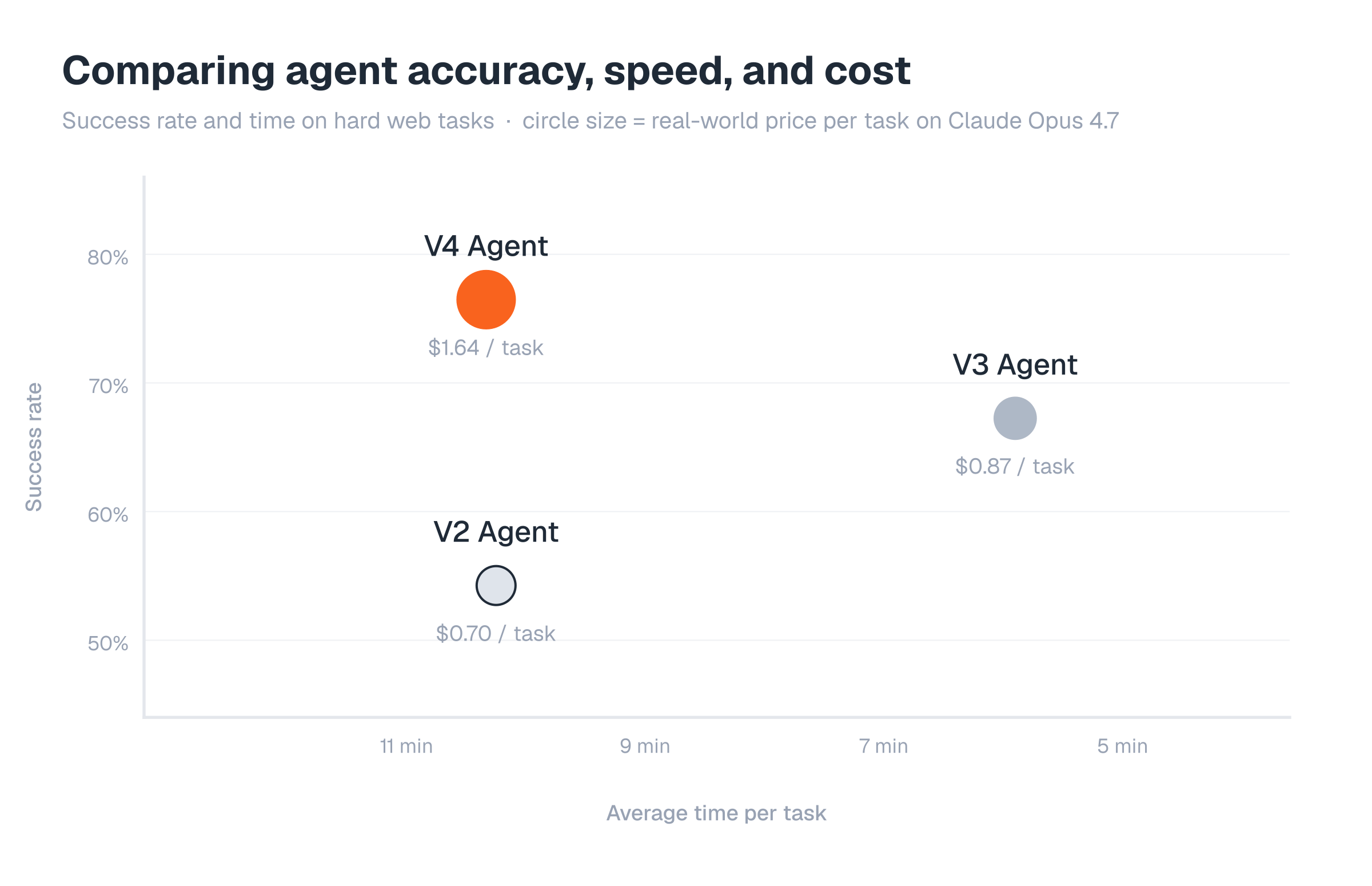
Measured with the same model — Claude Opus 4.7 — across the last 30 days of production usage, the typical customer's successful task costs \$0.70 on V2, \$0.87 on V3, and \$1.64 on V4, taking about 1, 2, and 5 minutes respectively. V4 costs more per task because customers use it for more complex work, and V2's tasks run shortest only because it gets the simplest ones. On identical hard tasks, V3 is the fastest agent (about 6 minutes, versus about 10 for V2 and V4).
| | V2 Agent | V3 Agent | V4 Agent |
| ------------- | -------- | -------- | -------- |
| Cost per task | \$0.70 | \$0.87 | \$1.64 |
| Time per task | \~1 min | \~2 min | \~5 min |
## Typical tasks cost \$0.70–\$1.64
Measured with the same model — Claude Opus 4.7 — across the last 30 days of production usage, the typical customer's successful task costs \$0.70 on V2, \$0.87 on V3, and \$1.64 on V4, taking about 1, 2, and 5 minutes respectively. V4 costs more per task because customers use it for more complex work, and V2's tasks run shortest only because it gets the simplest ones. On identical hard tasks, V3 is the fastest agent (about 6 minutes, versus about 10 for V2 and V4).
| | V2 Agent | V3 Agent | V4 Agent |
| ------------- | -------- | -------- | -------- |
| Cost per task | \$0.70 | \$0.87 | \$1.64 |
| Time per task | \~1 min | \~2 min | \~5 min |
 ## Comparing accuracy, speed, and cost
 ## How we measured this
In July 2026, we ran each agent four times on Internal Bench Hard: 106 difficult tasks on real websites. Every run used Claude Opus 4.8, and the same independent judge scored each result. We left out tasks blocked by websites' anti-bot measures. The speed and cost figures are averages; simpler tasks usually run faster and cost less. Real-world cost and speed figures are the median customer's successful task with Claude Opus 4.7 over the last 30 days of production, our own testing excluded.
## How we measured this
In July 2026, we ran each agent four times on Internal Bench Hard: 106 difficult tasks on real websites. Every run used Claude Opus 4.8, and the same independent judge scored each result. We left out tasks blocked by websites' anti-bot measures. The speed and cost figures are averages; simpler tasks usually run faster and cost less. Real-world cost and speed figures are the median customer's successful task with Claude Opus 4.7 over the last 30 days of production, our own testing excluded.